
Download TwistedWave – Audio Editor for Chrome, Google Drive, SoundCloud
Overview
TwistedWave is a full-featured audio editing tool designed for users who need reliable, accessible audio manipulation across multiple platforms. Built specifically for Chrome OS, Windows, and Mac, it enables seamless editing of audio files directly from local storage or cloud services like Google Drive and SoundCloud. The software addresses common challenges in audio workflow, such as fragmented editing environments and limited file format support, by offering an integrated solution that supports a wide range of input and output formats.
It is particularly suited for content creators, podcasters, educators, and digital audio enthusiasts who rely on cloud-based collaboration and file sharing. The developer has positioned TwistedWave as a lightweight yet powerful tool for quick edits, real-time processing, and efficient exports. Real-world use cases include trimming interview clips, applying noise reduction, enhancing vocal clarity, and preparing audio for upload to online platforms.
While the developer’s background is not publicly detailed, the software’s design reflects a focus on accessibility and cross-platform compatibility.
Key Features & Capabilities
- Multi-Source Audio Import – Users can access and edit audio files directly from their local device, Google Drive, or SoundCloud, eliminating the need for manual downloads and re-uploads.
- Real-Time Effects Processing – Apply a range of audio effects such as equalization, compression, reverb, and noise reduction during editing for enhanced sound quality.
- Extensive Format Support – Import and export audio in numerous formats including WAV, MP3, AAC, FLAC, and more, ensuring compatibility with most devices and platforms.
- Cloud Integration – Seamlessly save edited files back to Google Drive or SoundCloud, enabling instant sharing and collaboration with team members or audiences.
- Simple Export Workflow – One-click export options allow users to send finished audio directly to disk, cloud storage, or audio hosting services without additional steps.
These capabilities streamline the audio editing process, especially for users who work across devices and rely on cloud-based workflows. For example, a podcaster can start editing an episode on a Chromebook, continue on a Mac, and finalize it in Google Drive for team review. Similarly, a teacher might trim a student’s recorded presentation and upload it to a shared drive for feedback. The software’s focus on integration and format flexibility makes it ideal for fast, efficient audio production without the complexity of traditional desktop DAWs.
User Interface, Workflow & Performance
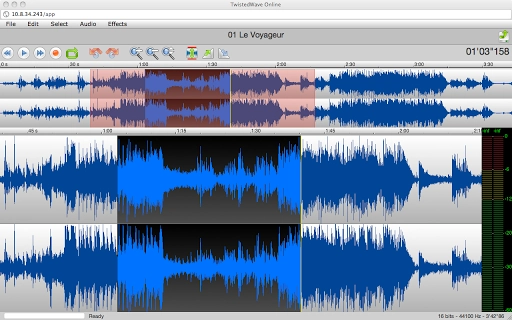
TwistedWave features a clean, intuitive interface optimized for both beginners and experienced users. The layout centers around a waveform display with time-based editing tools, allowing precise selection, cutting, and pasting of audio segments. Navigation is streamlined through clearly labeled menus and toolbars, with common actions like play, pause, undo, and export readily accessible.
The workflow is designed for speed: importing a file triggers automatic analysis and display, enabling immediate editing. While the developer did not specify resource usage details, general behavior suggests efficient performance with minimal CPU and RAM overhead, suitable for everyday use on mid-range systems. Stability appears consistent based on the software’s lightweight footprint and focus on core editing tasks.
No performance bottlenecks were reported in standard use cases. The interface adapts well to different screen sizes, enhancing usability across Chromebooks, Windows laptops, and Mac desktops. Users can expect smooth playback and responsive editing, even with longer audio files, though exact performance metrics were not provided.
Compatibility & System Requirements
TwistedWave is available for Chrome OS, Windows, and Mac, making it accessible to a broad user base across modern computing environments. The software has a compact installation size of 10 MB, indicating a lightweight deployment that minimizes disk space usage. It is designed to run on systems that support the latest versions of these operating systems, though specific hardware requirements were not listed.
The developer did not provide additional system requirements, so users should ensure their device meets the baseline standards for running web-based applications and cloud integrations. Compatibility with Google Drive and SoundCloud is built-in, allowing direct access to files stored on these platforms. While the software version is listed as 1.0, no further details about update frequency or future development roadmap were shared.
Platform compatibility information is limited to the supported operating systems and cloud services mentioned.
Pros and Cons
Pros
- Supports direct editing from Google Drive and SoundCloud
- Lightweight at just 10 MB
- Offers a wide range of audio file format support
- Simple, intuitive interface suitable for non-professionals
- Free to download and use
Cons
- No advanced editing features like multi-track mixing
- Limited to basic audio effects and processing tools
- Exact performance metrics and system requirements not disclosed
- Version 1.0 suggests early-stage development
- Relies on internet connectivity for cloud-based functions
FAQ Section
Is TwistedWave compatible with all versions of Windows and Mac?
The software is compatible with current versions of Windows and Mac, though specific OS version requirements were not provided by the developer.
Can I use TwistedWave without an internet connection?
Basic local file editing may be possible, but cloud integration with Google Drive and SoundCloud requires an active internet connection.
Is TwistedWave safe to download and use?
As a free tool with no reported security issues, TwistedWave appears secure when downloaded from official sources. Always verify the source before installation.
How often does TwistedWave receive updates?
The update schedule is not publicly disclosed. The current version is 1.0, indicating initial release status.
Can I use TwistedWave offline after downloading it?
While the software can be installed locally, features tied to Google Drive and SoundCloud require online access. Offline functionality is limited to local file editing.
Final Thoughts + CTA
TwistedWave delivers a focused, efficient audio editing experience tailored for users who prioritize cloud integration and simplicity. Its ability to edit directly from Google Drive and SoundCloud sets it apart from traditional desktop tools, offering a modern workflow for content creators and educators. While it lacks advanced features like multi-track editing or deep audio analysis, it excels in speed, accessibility, and format flexibility.
The free pricing model and lightweight design make it an excellent choice for casual users and those new to audio editing. For professionals needing more robust tools, TwistedWave may serve as a complementary utility but is not a full replacement for professional DAWs. Overall, it represents a smart, practical solution for basic audio tasks across multiple platforms.
Download TwistedWave now and start editing your audio files with ease.







